
2. Architecture
2. Architecture
This chapter describes the request flow exchanged between ONE RAMP, your game server, and the blockchain.
2.1 Components
| Component | Role | Owned by |
|---|---|---|
| RAMP F/E | User UI, real-time transaction status display | NEXUS |
| RAMP B/E | Request processing and validation, Validator signature requests | NEXUS |
| Game Client | Opens RAMP F/E, shows progress | You |
| Game Server | Validates, deducts, and restores game assets; handles signing | You |
| Blockchain Network | Executes the actual Mint/Burn transactions | ONE Chain |
2.2 Absolute Rules
- ① Mint deducts first — deduct the game assets, then issue the tokens. If the transaction fails, you must restore them.
- ② Burn executes first — run the blockchain transaction, then grant the game assets. If it fails, do not grant them.
- ③ Always cross-check at step 12 — confirm that the assets and amounts RAMP requested match the actual in-game values. Skipping this lets arbitrary-amount requests through.
- ④ Idempotency on
uuid— the result Webhook is resent up to 20 times. Apply the sameuuidonly once.
2.3 Mint Sequence
Consumes game assets to issue tokens. Assets are deducted at step 12, and restored at step 17 if the transaction fails.
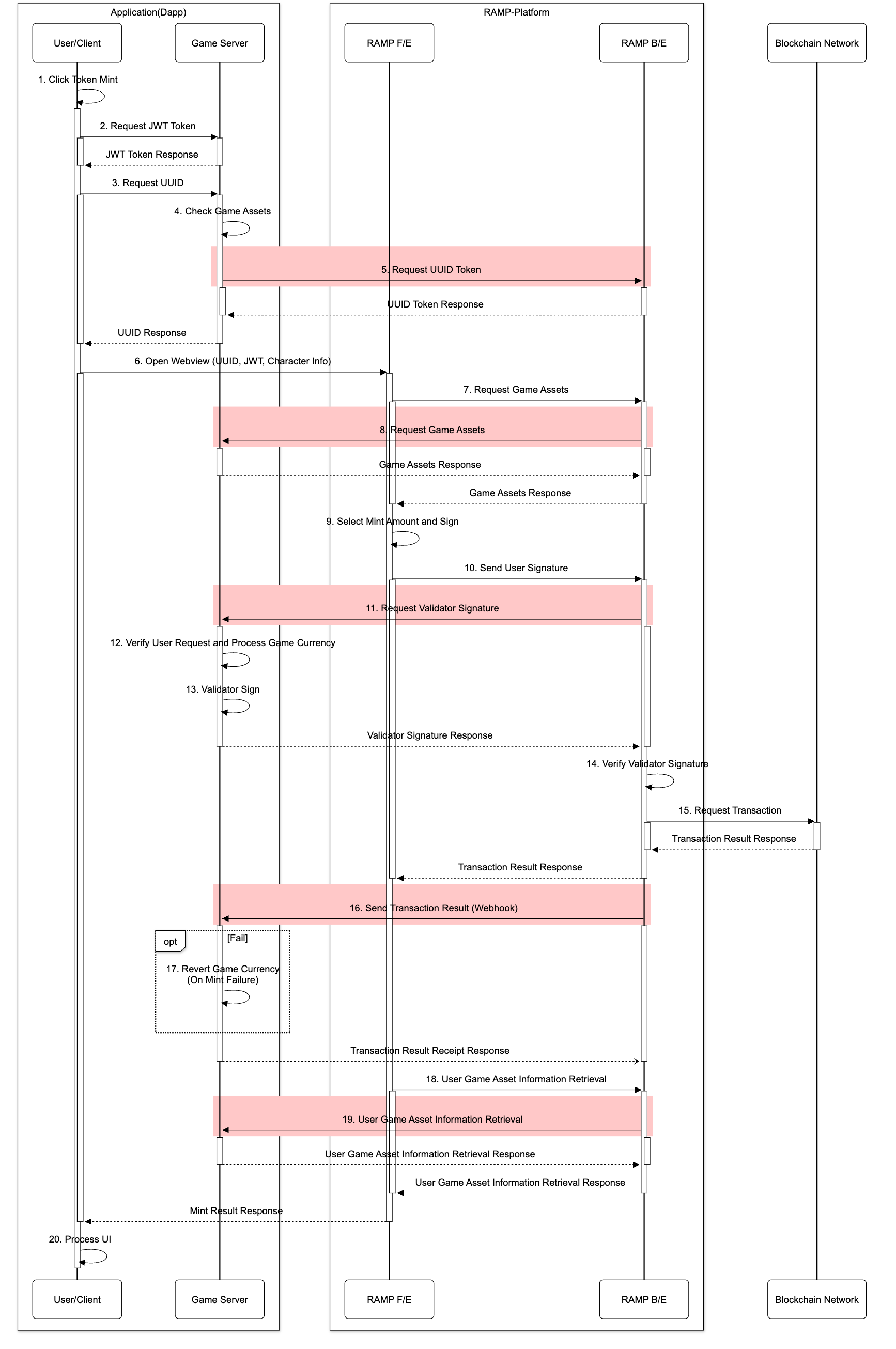
| No. | Step | Notes |
|---|---|---|
| 1 | User requests a token Mint | |
| 2 | Request a JWT token | Used in flows 9 and 14; the game server must verify it |
| 3 | Request a UUID | |
| 4 | Look up the game assets needed for the Mint | |
| 5 | Obtain the UUID by calling the RAMP API | Includes Mint information such as intent → 5.3 |
| 6 | Open the RAMP F/E WebView | Includes uuid, JWT, and sessionId |
| 7 | Request asset data for F/E calculations | |
| 8 | Look up the user's game assets | → 5. Endpoint Specification |
| 9 | User chooses to Mint in the F/E | Signs with their wallet |
| 10 | The user's signature is forwarded | |
| 11 | Request the Validator signature from the game server | → 5. Endpoint Specification |
| 12 | Validate the Mint request, then deduct game assets | Must be restored on failure |
| 13 | Validator signature | Signed with the Validator private key registered in the console |
| 14 | Verify the Validator signature | Verified against the Validator address registered in the console |
| 15 | Submit the blockchain transaction | |
| 16 | Send the result to the game server | → 5. Endpoint Specification |
| 17 | Handle the result | Restore game assets on failure |
| 18–19 | Re-query assets | |
| 20 | Render the result in the game UI |
2.4 Burn Sequence
Burns tokens to grant game assets. Assets are granted at step 17, only after the transaction succeeds.
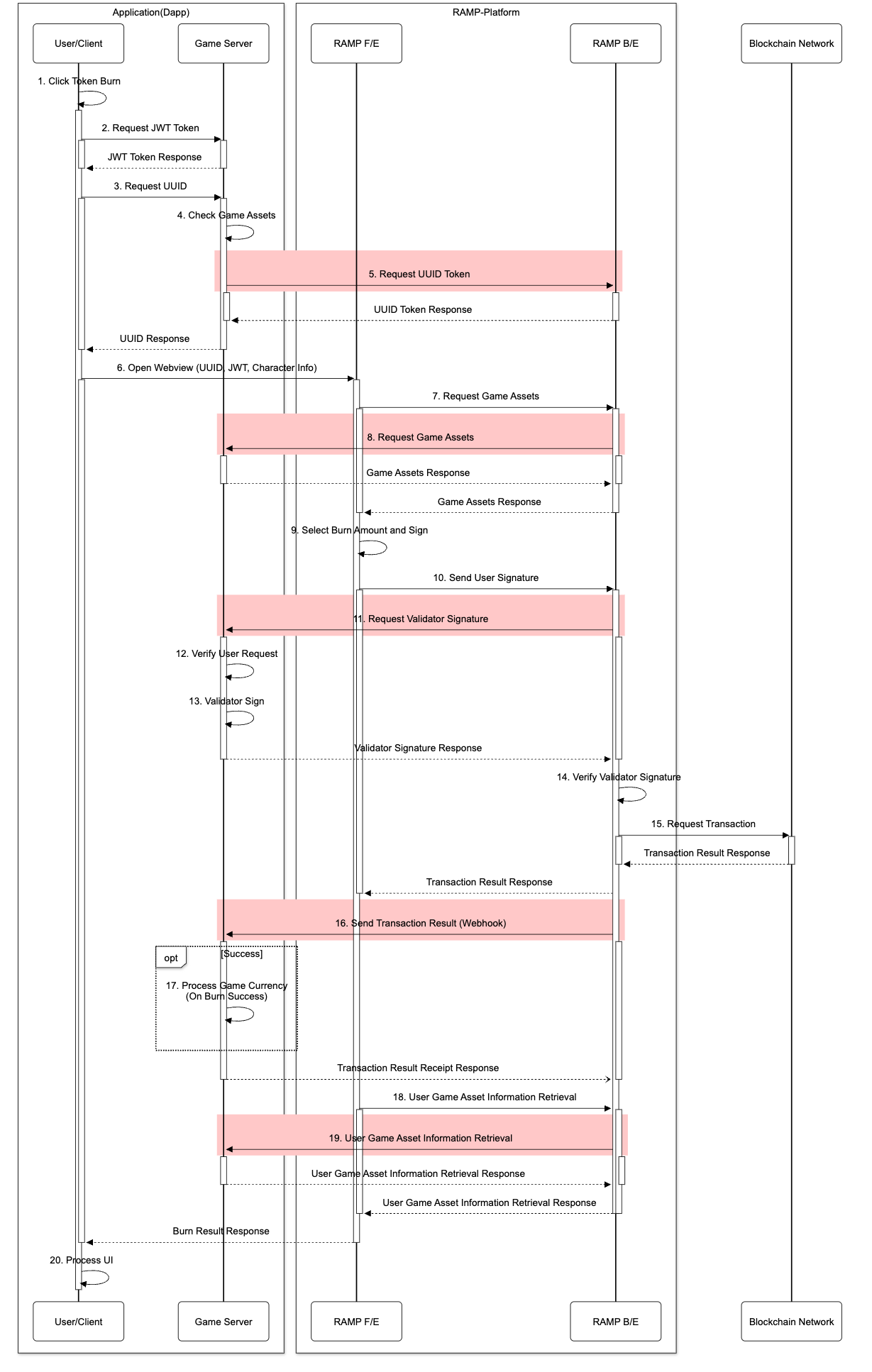
Differences from Mint
The steps are the same; only the following differ.
| Item | Mint | Burn |
|---|---|---|
| Asset handling order | Deduct assets → transaction | Transaction → grant assets |
| Step 12 | Validate + deduct assets | Validate only |
| Step 17 | Restore assets on failure | Grant assets only on success |
intent.method | mint | burn-permit |
intent.type | assemble | disassemble |
intent.from | Game asset (asset) | Token (ERC20) |
intent.to | Token (ERC20) | Game asset (asset) |
2.5 Failure Handling Summary
| Failure point | How it is detected | What you must do |
|---|---|---|
| Signature validation | A policy violation is detected in Validate Order | Return a failure response without signing — no action needed, since assets have not been deducted |
| Blockchain Mint failure | receipt.status != 0x1 | Restore the deducted game assets |
| Blockchain Burn failure | receipt.status != 0x1 | Do not grant the game assets |
| Webhook not received | Resent up to 20 times within 12 hours | Return HTTP 200, then block duplicates by uuid |
| UUID expired | More than 5 minutes since issuance | Call initialize again |
Updated about 2 months ago